Sunday, January 2, 2011

Where Now?

Gary and I are a bit confused as to where to go from here. What do I mean? Well, we have the perfect amount of bookings. We have decided to have a limited amount this year in order to enjoy what we do a little more, and also, to have ample time with our family rather than our computers. Also, we are waiting for a little baby through adoption so we have no idea when that will happen. Therefore, we want to make sure that we are not too busy when it actually does happen.

What I am unsure about is whether or not we want to have a `professional' website. The purpose wouldn't be to get more clients, but rather to showcase what we have done in a better way. I would love various galleries etc but I don't know how to do that and I don't even know if blogger can do it. Gary says that we have programs to make one but I have no idea how many billions of hours (most of them probably in sheer frustration) would be needed. Gary has no time to do it (teaching and coaching basketball), so it would just be me. We would need a new domain, new host etc. I'm so not computer savvy.

We don't want to spend a lot of money on it because spending more money means charging more money. I like being a small business. I like the simplicity of it. It's probably the opposite of what any business person actually is supposed to be like.

Anyone have any input? Thoughts? Insight? If you don't want to comment here, you can always email at gcphotography@shaw.ca

Thanks for reading!
Louise

Monday, November 22, 2010

Editing Steps

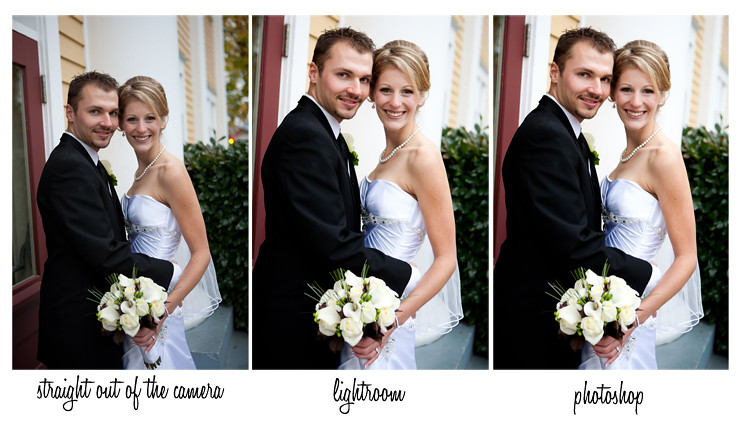
People often ask what I do/use to edit. This isn't an exciting picture but I didn't want to over think what picture to use. Obviously each picture undergoes different editing but generally my steps are somewhat the same.


1. We always, always shoot in RAW (the camera doesn't `develop' the picture for you, you have the control to do what you want afterwards).

2. Then, we import into Lightroom. Now, if you are looking for editing software, it is great. You can try a 30 day trial for free. Anyway, the things that I usually do in lightroom are similar to what I did for this picture. The amounts are always different but the steps are usually somewhat similar.
a. Crop
b. Reduce noise (by 80%..you know, all that grainy stuff)
c. Increase exposure (+.6, brightens it up)
d. Contrast (+47)
e. Black (7)
f. Highlights (-7, gets rid of some of the bright parts from increasing exposure)
I always edit all my photos in lightroom and convert them to black and white as well. Each photo is so different, and other things might include; white balance, temperature, vignetting etc. Then, I go through the photos again in photoshop. I don't edit all the photos there, I just do some that need it. Usually 1/3 of them.

3. Photoshop. In this case I used the clone stamp tool under their eyes and reduced it to 48% opacity so the lines under the eyes are still realistic, just not dark circles. I also increased the contrast by 5. If someone had a big zit, cold sore, or stamp on their hand etc, I would also edit that here in photoshop.

I know I don't post on here very often but that was a question that I've been asked lately:)

Friday, August 27, 2010

Wall Bounce

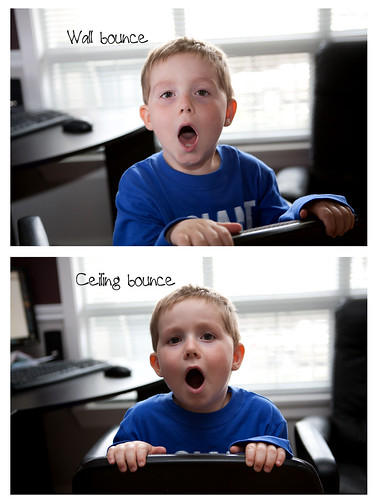
Just a quickie....all I want to say is that I was a ceiling bouncer (bounced my external flash off of the ceiling) before in indoor low light situations, but now, I'm trying to be more of a wall bouncer. Way less raccoon eye. If you don't have a big white wall to bounce off of, you can use a reflector or even someone wearing a white shirt:)
This was my first try...too much flash but you get the idea. Just dial it down a bit. Please excuse my model. He wanted to yawn for the picture. Very attractive, Kai. I had also tried doing one with Gary but yawning Kai is more attractive than sick Gary:)

Tuesday, August 17, 2010

Light Reading

Currently reading `Captured By the Light' by David A. Ziser (check out his blog, updated daily). So far, so good! Always a ton more to learn and if we could improve in one area, this is it for sure.

Monday, August 16, 2010

I'm Sure Your DSLR Is Nifty But...

Okay, I hope this doesn't sound mean but I just need to let the general public know about a few things. Generally, everyone is very courteous and follows the unspoken `rules'. There are some great photographers attending weddings who are guests and are super respectful and aware of our roles. I would say that 99% of people are really wonderful at being aware of our time, where we are, and what we do.

I know everyone has a snazzy (or nifty!) DSLR now and there are SO many cameras at weddings. I know you want to practice and capture the moment and see what your camera can do, but, there are a few things to keep in mind. As I have photographed a wedding or two (18 this year) there are a few things that drive me bonkers.

1. Yes, you have a nifty DSLR that I'm sure takes great pictures BUT you shouldn't be standing up in the middle of the aisle taking pictures during the ceremony. Especially not standing up, or putting your camera in front of mine, during the kiss or vows etc. Unless you're a grandpa, then you can do it (I'm only saying that because a cute grandpa did that last weekend:)

2. Yes, I'm sure you have a nifty DSLR but you probably don't need to have your camera on continuous rapid shutter, especially during the vows or a prayer or something. Kind of distracting to the guests, don't you think? And really, are you going to post 50 pictures of the exact same thing to facebook?

3. Yes, I'm sure you have a nifty DSLR but do you really need to take 100 pictures, with direct flash, during the first dance or cake cutting?! Kind of blows out some of our photos, in case you were wondering! One or two pictures are fine.

4. Yes, I'm sure you have a nifty DSLR but family photo time is family photo time. It's not `Hey, everyone in the family, grab a camera and let's take pictures of all the family combos!!!'. You can get a photo later from the bride and groom. Or, you can hide off to the side and quietly take one. Thanks!

5. Yes, I'm sure you have a nifty DSLR with lots of ideas for photos but unless you are my husband, the mother of the bride, the bride and groom, or in the wedding party, I don't need your advice on where to stand or what YOU think would be a great picture. I'm not trying to sound conceited, I just get a lot of unsolicited advice.

6. And, my number one pet peeve: Yes, I'm sure you have a nifty DSLR but unless you have asked the bride and groom as well as the photographers if you can follow along and shoot...do not follow the wedding party for their portrait session getting all of `your' shots. We usually have limited time and don't need distractions (random flashes, someone in the way, people looking at the wrong camera).

Seriously, I don't mean this in a mean way. Informative. We photographed 3 weddings this week alone so it just starts to bug you after a while, ya know? I don't do well with criticism and don't mean to hurt anyone so please be nice:)


Tuesday, May 25, 2010

Wedding Photography; Adding It Up

Just thought I would share the approx. hours that go into wedding photography. I will also indicate who does what with a G (Gary) or L (Louise):

(L)Emailing with bride/groom: 1 hour
(G) Prepping equipment, recharging batteries, reformatting cards, cleaning sensors, packing camera bags: 1 hour
(G+L)Meeting with the bride/groom or checking out new location:1 hour
(L)Engagement shoot (including driving): 2 hours
(L)Editing engagement shoot, (G)burning disk and (L) mailing the CD: 4 hours
(L) Planning itinerary and getting directions/maps all ready to go: .5 hours
(L)Wedding day coverage for Louise (getting ready to end of portraits with driving): 8 hours
(G)Wedding day coverage for Gary (ceremony to mid reception with driving): 10 hours
(L)Uploading, (G)backing up, and (L) going through photos (deleting super overexposed or eyes closed): 3 hours
(L)Editing photos (first in lightroom and then in photoshop): 30 hours
(G)Making slideshow: 4 hours
(G)Renumbering pictures, burning disks and (L)mailing packages: 2 hours
TOTAL:65.5

For 2010, the cost of wedding photography was $1200.00 which is less than $20.00/hour. We feel that we have really built up our portfolio and offer great photos. Needless to say, our 2011 prices will be higher as this doesn't even take into account our equipment and supplies:)

Thursday, May 20, 2010

Camera Body Upgrade

Gary has a Canon 5D and I have a Canon 40D. I'm looking to sell my 40D and upgrade to either a 70D or 5D (problem is we'll lose the higher frames per second with the 5D). Thoughts?